EC2 Pricing and Availability
Find which AWS Regions and AZs an EC2 instance type is available in, plus the on-demand price for Windows and Linux.
Use case:
When a new AWS EC2 Instance type is released, it may initially be limited to a few AWS Regions and Availability Zones (AZs). Additionally, the hourly instance price may differ between Regions.
This PowerShell script generates a consolidated table showing the Region, Availability Zone, and On-Demand Price for specified instance sizes. This can be helpful when selecting the best locaction to launch EC2 Instances.
Example: m8a instances are available in 3 of the 6 AZs in us-east-1.
Region                   AvailabilityZones
------                   -----------------
US East (N. Virginia)    use1-az2, use1-az4, use1-az6
Example: the m8a.xlarge instance hourly, on-demand price compared by OS and Region:
Region                   LinuxPrice WindowsPrice
------                   ---------- ------------
US East (N. Virginia)    $0.243     $0.427
Asia Pacific (Tokyo)     $0.314     $0.498
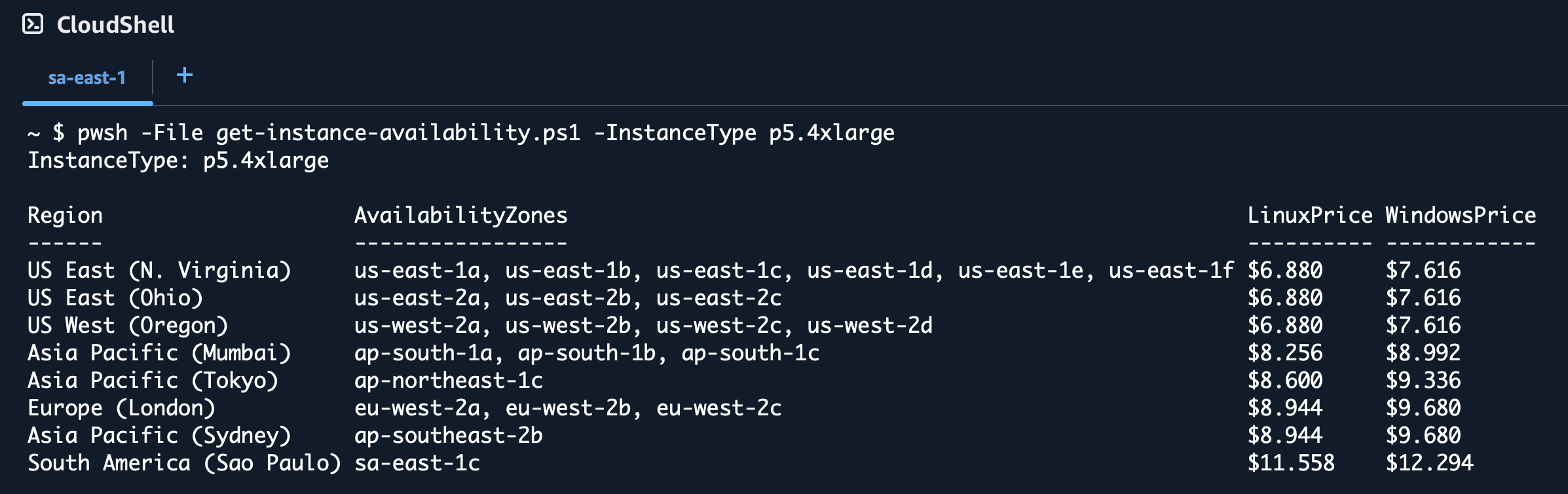
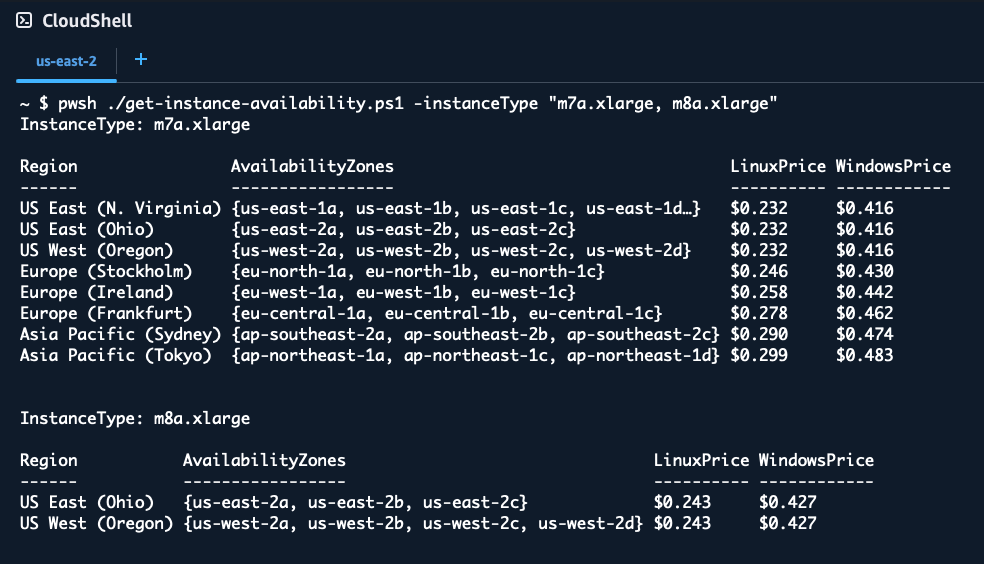
The get-instance-availability.ps1 script queries all enabled AWS Regions to find where the specified EC2 instance types are available, and shows the Availability Zones or ZoneIDs, plus the on-demand pricing for Linux and Windows.
Use the -ZoneID switch to show AZ IDs (e.g., use2-az1) instead of AZ names (e.g., us-east-2a)
The PowerShell script retrieves real-time pricing data from the AWS Pricing API and displays results in a formatted table showing regional availability and hourly costs.
RECOMMENDED: Run this PowerShell script from AWS CloudShell for the best experience. CloudShell comes with PowerShell and AWS modules pre-installed, and credentials are automatically configured. Simply upload the script and run it.
Examples Syntax:
.PARAMETER InstanceType
    One or more EC2 instance types to query. Accepts comma-separated values.
    Default: m8i.4xlarge

.PARAMETER Region
    One or more AWS regions, region prefixes (e.g. 'us', 'eu-west'), or 'all'.
    Supports arrays: -Region us-east-1, us-east-2
    Prefix matching: -Region us (matches all us-* regions)
    Defaults to all enabled regions.

.PARAMETER SortBy
    Sort results by Region or Price.
    Default: Region

.PARAMETER ZoneId
    Display AZ IDs (e.g., use2-az1) instead of AZ names (e.g., us-east-2a).

.PARAMETER TPC1
    Show an additional Windows TPC=1 pricing column (Optimize CPUs with ThreadsPerCore=1).

.PARAMETER Hours
    Number of hours for cost calculation, or 'month' (730) / 'year' (8760).
    Default: 1 (hourly rate)

.EXAMPLE
    pwsh -File get-instance-availability.ps1
    Run with default parameters (m8i.4xlarge, sorted by Region).

.EXAMPLE
    pwsh -File get-instance-availability.ps1 -InstanceType m8a.2xlarge
    Query availability and pricing for m8a.2xlarge instances across all regions.

.EXAMPLE
    pwsh -File get-instance-availability.ps1 -InstanceType "m7i.2xlarge,m8i.2xlarge" -SortBy Price
    Query multiple instance types and sort results by price.

.EXAMPLE
    pwsh -File get-instance-availability.ps1 -InstanceType m8i.xlarge -TPC1
    Show Windows TPC=1 pricing column.

.EXAMPLE
    pwsh -File get-instance-availability.ps1 -Region us
    Query default instance type across all US regions only.

.EXAMPLE
    pwsh -File get-instance-availability.ps1 -Region us-east-1,eu-west-1 -InstanceType m7i.xlarge
    Query m7i.xlarge in specific regions.

.EXAMPLE
    pwsh -File get-instance-availability.ps1 -ZoneId
    Display results with AZ IDs (use2-az1) instead of AZ names (us-east-2a).

.EXAMPLE
    pwsh -File get-instance-availability.ps1 -Region us -Hours month
    Query US regions with monthly (730 hours) cost estimates.

.NOTES
    Author: coolcrai@amazon.com
    Version: 1.1
    Last Updated: February 27, 2026

    RECOMMENDED: Run this script from AWS CloudShell for the best experience.
    CloudShell comes with PowerShell and AWS modules pre-installed, and credentials
    are automatically configured. Simply upload the script and run it.

    Requirements:
    - AWS PowerShell modules: AWS.Tools.EC2, AWS.Tools.Pricing
    - Valid AWS credentials configured
    - Pricing API access (queries us-east-1 region)

    Pricing Information:
    - Linux pricing is for standard Linux/Unix instances
    - Windows Default pricing includes license costs (License Included model)
    - Windows TPC=1 pricing is Linux base + (cores x $0.046/vCPU-hr Windows license rate)
    - Windows TPC=1 shows N/A for t3/t3a burstable and bare metal instances
    - All prices are hourly on-demand rates in USD
Example output from CloudShell
$ pwsh -File get-instance-availability.ps1 -InstanceType "m7a.xlarge, m8a.xlarge"
$ pwsh -File get-instance-availability.ps1 -InstanceType p5.4xlarge -ZoneID -Sortby Price